
How LMS Software Is Reshaping Learning at Work
Home » Informational » How LMS Software Is Reshaping Learning at Work
You do not notice the problem when training fails outright. You notice it when training works, yet still falls behind. The course is solid. Completion rates look fine. But six months later, the skills you trained for are already outdated. Not because your team did anything wrong, but because the pace of change has outgrown the way learning is delivered.
This is the real pressure facing HR and L&D teams today. Skills now decay faster than most programs can be updated, and the gap between what employees need to know and when they need it keeps widening. LMS software sits at the center of that gap. Not as a shiny solution, but as infrastructure.
A learning management system for education either lets you adapt in time or quietly locks you into old assumptions. Choosing online LMS software is not about features or trends. It is a decision about whether your education LMS can keep up with reality.
What Is LMS Software and How Does It Work?
The term sounds heavier than it is. LMS software is simply the system that runs learning once it no longer fits in spreadsheets and inboxes. A learning management system for education exists to deliver training, track progress, and show whether learning actually happened.
At its core, an education LMS does three things well:
- It controls access, who learns what, and when
- It organizes content, courses, assessments, and certifications
- It records outcomes, completion, scores, and time spent
That may not sound ambitious, but it solves a real problem. Most training programs fail not because the content is weak, but because coordination breaks down at scale.
Online LMS software removes the administrative drag that once dominated training. Course assignments, reminders, compliance tracking, reporting, all of it runs in the background. That automation frees learning teams to focus on designing programs that transfer skills rather than chasing updates.
The workflow is intentionally simple. Administrators create or upload courses and assign them by role or need. Learners log in, complete modules, and take assessments. The system captures every interaction and turns it into usable data.
In practice, this is what keeps employee development functional. When a new hire joins, the LMS software automatically enrolls them in onboarding and compliance training, tracks progress, and alerts managers if anything stalls. Records stay clean, follow-ups are automatic, and learning does not depend on memory or manual effort.
The Evolution of Learning Platforms
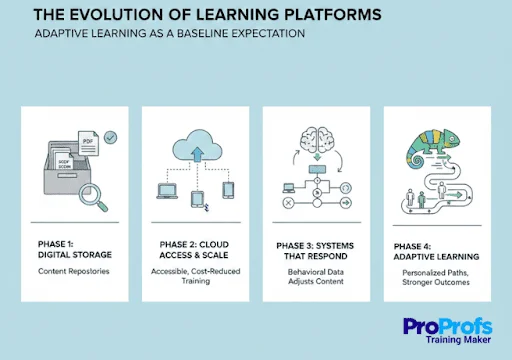
Learning platforms did not become complex overnight. They evolved in response to scale, cost, and the growing mismatch between how adults learn and how organizations train. Each phase reflects a shift in what LMS software was expected to solve.
Phase 1: Digital Storage, Not Learning
The earliest learning management systems for education served little more than as content repositories. PDFs and SCORM files were assigned, access was tracked, and completion was treated as success, even when engagement was minimal.
Phase 2: Cloud Access and Scale
Cloud delivery removed the need for on-premise installations and heavy IT support. Online LMS software made structured learning accessible to smaller organizations, reducing costs and enabling consistent training without the need for enterprise-level infrastructure.
Phase 3: Systems That Respond, Not Just Record
As platforms matured, LMS software began using behavioral data to adjust content delivery. Learners who struggled received reinforcement, while those progressing quickly avoided unnecessary repetition. The system adapted, even if modestly, to how people actually learned.
Phase 4: Adaptive Learning as a Baseline Expectation
Today, an education LMS is evaluated by its ability to support different learning speeds and starting points. Standardized delivery may simplify administration, but adaptive systems produce stronger outcomes by respecting the realities of adult learning.
Key Features That Actually Matter
A long list of features does not tell you whether an LMS will actually work. What matters is whether those features reduce friction, save time, improve retention, or surface gaps before they become risks.
1. AI-Powered Content Creation
AI shortens the distance between need and delivery. LMS software can generate quizzes, outlines, and draft content in minutes instead of weeks.
For learning teams, this means faster updates and less manual effort. Training stays current without expanding workload.
2. Personalized Learning Paths
Personalized learning paths exist to eliminate wasted time. LMS software uses diagnostics and performance data to decide what a learner actually needs, then removes everything else. Advanced users move faster. Beginners get support where they struggle.
For organizations, this means shorter training cycles and faster skill readiness. A learning management system for education that adapts to the learner and reaches competency without forcing everyone through the same sequence.
3. Integrations With Everyday Work Tools
Training works best when it is embedded in daily work. An education LMS that integrates with HR systems, CRMs, and communication tools removes friction from assignment, tracking, and follow-up.
Online LMS software with strong integrations turns learning into a background process. Courses trigger automatically, progress updates itself, and managers stay informed without manual reporting.
4. Data-Driven Analytics for Identifying Skill Gaps
Analytics exist to show exposure, not activity. LMS software should make it clear which skills are missing, where teams struggle, and who needs intervention.
When reporting moves beyond completion, training becomes proactive. Organizations can address gaps before they surface as performance or compliance issues.
5. Gamification That Supports Momentum
Gamification is useful when it signals progress. Visual milestones and completion cues help learners understand where they are and what remains.
In a learning management system for education, this reduces drop-off. People finish training when progress is visible, and effort feels acknowledged.
Benefits of LMS Software for Digital Education and Workplace Development
The value of LMS software shows up in how quickly people build usable skills and how little effort it takes to do so.
1. Faster Skill Readiness
A learning management system for education reduces the time between identifying a skill gap and closing it. Training is available immediately, not scheduled weeks out, so teams can respond to change without waiting.
2. Consistent Training Across Teams
Online LMS software ensures everyone receives the same standards, processes, and knowledge, regardless of role or location. This consistency reduces errors and prevents knowledge gaps caused by informal or uneven training.
3. Lower Cost Per Learner
Digital delivery replaces travel, venues, and repeated instructor-led sessions. An education LMS scales training without increasing cost, making ongoing development financially sustainable.
4. Higher Training Completion Rates
Automated enrollment, reminders, and progress tracking reduce drop-off. LMS software removes the small barriers that cause people to abandon training, leading to more skills actually being developed.
5. Clear Visibility Into Skill Gaps
Reporting shows what employees can do, not just what they have accessed. Organizations can see where knowledge is weak and address gaps before they affect performance or compliance.
6. Stronger Link Between Learning and Performance
When training data connects to job outcomes, learning becomes measurable. LMS software helps demonstrate which programs improve productivity, quality, or revenue, making development a business asset rather than a cost center.
Challenges and Implementation Considerations
Education LMS platforms promise efficiency, but implementation is where most value is either realized or lost. The risks are operational, not theoretical, and they surface quickly when planning is shallow.
1. User Adoption Comes First: The main barrier is behavior change. If the LMS software feels heavy or confusing, people disengage before it delivers value. Choose intuitive systems and validate them with a small pilot before scaling.
2. Usability Beats Change Messaging: No rollout campaign can fix poor design. A learning management system for education should work without explanation. If access feels difficult, learning becomes optional.
3. Data Privacy and Trust: An education LMS stores sensitive learning data. Clear policies on access, storage, and protection are essential. Online LMS software must earn trust before it earns engagement.
4. Plan for Disruption, Not Perfection: Adoption is rarely smooth. Start small, expect friction, and expand only after the system proves it reduces effort. LMS software should support work, not monitor it.
Implementation succeeds when the LMS software feels like support, not surveillance.
Real-World Implementation Patterns
What separates effective LMS software deployments from stalled ones is not planning depth, but sequencing. Successful organizations align learning systems to how work evolves, not how training has historically been delivered.
1. Anchoring the LMS to Business Rhythms
High-performing teams map learning to moments of change. New hires, role transitions, process updates, regulatory shifts. The education LMS becomes responsive to business triggers rather than a static catalog refreshed once or twice a year.
2. Designing for Reuse, Not One-Off Programs
Instead of building large, linear courses, teams structure content as modular components. Short units can be recombined as needs change. This keeps training current without rebuilding from scratch and allows online LMS software to scale with less effort.
3. Separating Learning Signals From Performance Judgment
Successful organizations treat LMS data as diagnostic, not evaluative. Completion and assessment data is used to improve training and identify support needs, not to penalize employees. This separation builds trust and increases honest engagement.
4. Enabling Managers as Learning Multipliers
Managers are not content creators, but they are signal amplifiers. Effective implementations surface learning insights to managers at the right level, who then reinforce application through coaching and feedback. The LMS supports this without becoming a monitoring tool.
5. Choosing Systems That Fade Into the Background
The best LMS software becomes less visible over time. Automation handles enrollment, reminders, and tracking, while learning stays close to real work. Platforms such as ProProfs Training Maker reflect this direction by using AI to reduce administrative load while supporting varied training needs without complex configuration.
Future Trends: What’s Coming Next
Learning platforms are shifting from systems that respond to demand to systems that anticipate it. The changes ahead focus less on delivery and more on guidance.
- Agentic AI: LMS software will shift from reacting to learner input to proactively guiding skill development based on roles, performance patterns, and future business needs.
- Predictive Skill Mapping: A Learning management system for education platforms will forecast which skills are becoming critical and recommend training before gaps affect performance.
- Immersive Training Environments: Education LMS platforms will use augmented and virtual reality to simulate real-world scenarios, enabling safe practice for high-risk or complex tasks.
- Continuous Capability Monitoring: Online LMS software will track skill relevance over time and prompt reskilling as roles, tools, and markets evolve.
- Learning as Career Infrastructure: Training systems will align learning paths with long-term career trajectories, not just immediate role requirements.
- Widening Capability Gap: Organizations using advanced LMS software will build skills faster, while those relying on static training models will fall further behind.
Building a Resilient Workforce
The real risk in 2026 is not a lack of learning tools. It is treating capability as something you build once and revisit later. Skills now decay too quickly for that approach to work.
LMS software is not a nice-to-have layer. It is the infrastructure that determines whether learning can keep pace with change. On its own, it does nothing. Used intentionally, it makes continuous development possible at scale.
The decision leaders face is not whether to adopt a learning platform, but whether their learning systems reflect how fast their business is changing. Organizations that align learning to reality will adapt. Those who do not will fall behind, not because they lack effort, but because their systems cannot move fast enough.
 How Quality Print and Design Shape Powerful Business Cards
 List of Ice Cream Flavors | A-Z Vocabulary Word List
 List of Ice Cream Flavors with A | Popular Ice Cream Flavors Vocabulary